AI Christmas Video Generator
Put yourself in the Christmas videos everyone is posting. Pick a Christmas template below, add your photos and get your own AI video. We add new Christmas templates as the season's trends take off.
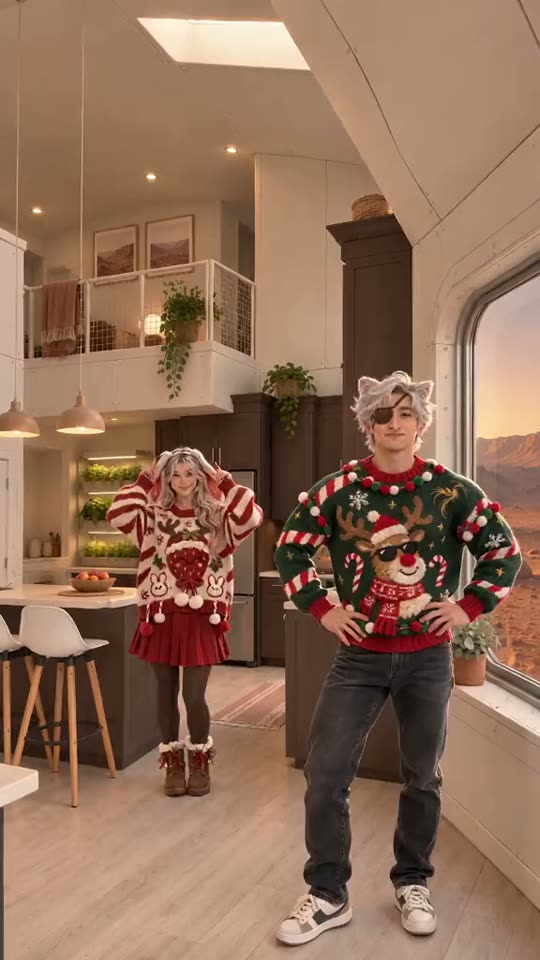
Christmas templates
| Template | Photos | Length | Format | Start |
|---|---|---|---|---|
| Christmas Dance AI Christmas duo dance · 2 photos | 2–3 | 15s | 9:16 | Make mine → |
One full video costs 50 credits; packs start at $9.99. Some templates have a free 5-second preview with a Google sign-in (once per person, with a TokClip watermark); not every template has one.
Which Christmas template should you pick?
Right now there is one: Christmas Dance AI, the duo dance from the TikTok Christmas pajama reel. It takes two photos, one adult each, makes a 15-second 9:16 video with sound, and lets you dance in the original kitchen, the Mars kitchen or a room photo of your own. We add more Christmas templates as they take off, so check back.
How to make your video
- 1Pick a template. Open one from the cards or table above and watch its example.
- 2Upload your photo. Use a clear, front-facing photo of an adult who agreed to appear. Templates for more than one person ask for one photo each.
- 3Generate and download. When the video is ready, download it and post it.
What it costs
A full video costs 50 credits on every template, and credit packs start at $9.99. There is no subscription and credits never expire. Some templates also have a free 5-second preview with a Google sign-in, once per person, with a TokClip watermark.
Questions
How does an AI Christmas video generator work?+−
You pick a Christmas template, upload photos of yourself (or of adults who agreed), and TokClip puts those people into the video from the reference clip. You download the finished video and post it.
How many photos do I need?+−
It depends on the template. Christmas Dance AI needs two photos, one adult each, plus an optional photo of a room. The table above lists it for every template.
Is it free?+−
You can try the templates that have a free 5-second preview with a Google sign-in, once per person, with a TokClip watermark. Full videos use credits, with packs from $9.99.
Can I use my own room as the background?+−
Yes, on Christmas Dance AI: add a photo of a room (an empty room works best) as the optional third photo, or tap the Mars kitchen. Skip it to dance in the original kitchen.
Which photos work best?+−
Sharp, well-lit photos with the whole face visible, looking at the camera; full-body photos work best for dances. Avoid sunglasses, heavy filters and photos where the person is tiny or cropped. Use only your own photos or an adult's photo with permission.